
For contractor and industrial finance teams
AI-assisted rental invoice auditing and monitoring
Catch rental overcharges. Spend less time reviewing invoices.
Compare equipment rental invoices with agreed rates. See the evidence behind potential overcharges, track credits and keep checking every billing cycle.
For a useful comparison, bring an invoice and its rate sheet. No credit card. No automatic subscription.
Free audit: up to 20 invoices from one vendor, issued in the last 90 days.

- You rent the fleet. Are you billed what you agreed? You rent the fleet: boom lifts, scissor lifts, telehandlers, excavators. Are you billed what you agreed? In this fictional example, 18 August 2026 invoices arrive from Example Rental Vendor.
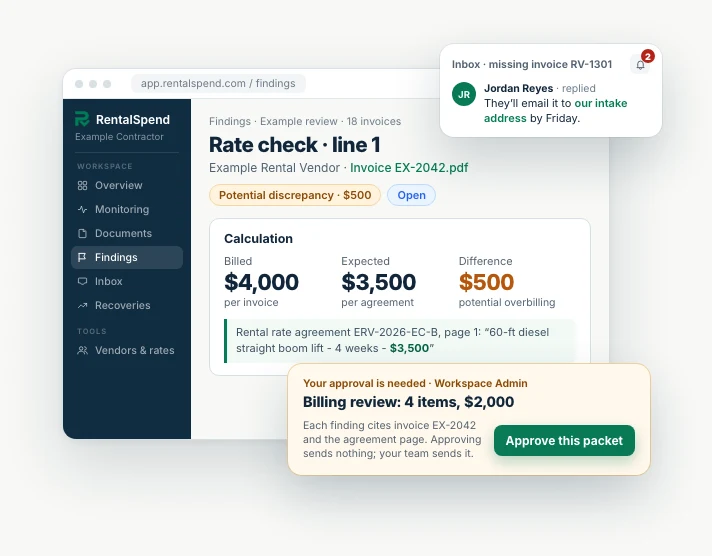
- Catch charges above your agreed rate. Invoice EX-2042 bills four 60-ft boom lifts at $4,000 each for four weeks. Rate agreement ERV-2026-EC-B, page 1, sets $3,500. RentalSpend reads both and shows the difference with its sources: $500 more per lift, $2,000 in potential overcharges.
- See every potential overcharge at once. Every invoice is checked the same way. Across the 18, six carry $12,000 in potential overcharges before tax: $6,000 above agreed rates (EX-2042's $2,000 is part of it), $4,500 in days billed after the documented off-rent date and $1,500 in a delivery charge above the agreed fixed amount. Potential until your vendor agrees.
- Ask your vendor, with the proof attached. RentalSpend bundles the four findings and their proof into one $2,000 vendor packet. Nothing is sent until your team approves it, and your team sends it; RentalSpend never contacts the vendor itself.
- Track credits and keep every cycle in check. Later, after reviewing the packet, the vendor issues credit memo CM-2242 for $2,000 against invoice EX-2042. RentalSpend keeps checking. In September 2026, three invoices from the same vendor have arrived and match the agreed rates, and invoice RV-1301 is flagged as expected but not received.
- Protect your rental spend from costly overcharges. Every invoice, checked against the rates you agreed.
Review invoices from the vendors you already use.
National and local vendors. No integration required.
- United Rentals
- Sunbelt Rentals
- Herc Rentals
- EquipmentShare
- Sunstate Equipment
- Cat Rentals
Vendor names are examples. RentalSpend is independent and is not affiliated with or endorsed by these companies.
What we check
Built for the way rental vendors bill.
Each check compares an invoice line with the agreement, rental records or printed figures behind it.
Every check is arithmetic against your own documents, with the page cited.
The RentalSpend platform
One place your whole team runs rental spend.
Documents come in from everyone.Vendors email invoices, field crews upload off-rent certs from a phone, accounting drops ERP exports — AI reads each one.
One set of findings for the whole team.Controllers, AP and equipment managers work from the same evidence — not spreadsheet copies.
Nothing falls through.Every follow-up has an owner, a target date and a shared Inbox thread.
Value that compounds every cycle.Credits stay tracked until applied, and each new billing cycle is checked automatically.
Free initial audit
Start in three steps.
Bring rental invoices and the rate sheet or contract that applied.
1–20 invoices · One vendor · Issued within 90 days
An older agreement is fine if it applied. Several invoices give a fuller comparison.
- 1
Share invoices
Upload rental invoices with the rate sheet or contract that applied. Add other records when you have them.
- 2
Review findings
See each potential discrepancy with its evidence, and any gaps that limit a check.
- 3
Follow up with clear evidence
Get the supporting details your team needs to question charges and track corrections.
No files ready? Look first, then come back with your own files.
- View a sample audit — no sign-in
- Try sample files — confirm your email in the app
We'll email you within 48 hours of submission with initial findings or a clear next step.
A simple, no-obligation start
No credit card. No obligation or automatic subscription.
Your free findings stay available whether or not you continue.
File formats and detailed intake questions are on Free audit details.
Optional ongoing monitoring
Less manual checking. Better control of your rental spend.
After the free audit, an optional monitoring subscription keeps checking invoices against your agreed rates each billing cycle and flags potential overcharges, so your team reviews less by hand.
- Reuse your agreed rates as new invoices arrive.
- Carry open findings forward until they are resolved.
- Keep credit follow-up in one place.
Rental billing monitoring
Example Contractor
September 2026
September 2026 — just evaluated
45-ft articulating boom lift
September 2026 — earlier
Light tower with generator

Pricing
Protect your rental budget for a small fraction of your annual rental spend.
From $99 a month. Save 10% when billed annually.
- Monitor invoices across all rental vendors
- Unlimited team members and collaboration
- Guided setup and ongoing support
Your team stays in control. Your documents are kept in private storage. Workspace access follows your membership and permissions; authorized RentalSpend staff may access records for support. Your team decides which findings to pursue and what to send to a vendor.
Questions.
- No. For a useful comparison, bring 1–20 invoices from one vendor, issued within 90 days, plus the rate sheet or contract that applied. Older agreements are fine if they applied. Missing records limit checks; your report explains the gaps. No files ready? Try our sample files, then come back for your free audit with your own files.
- You get findings or a clear next step to use with your vendor, and your free findings stay available either way. Ongoing monitoring is an optional subscription you choose separately; the free audit never starts one automatically.
- Your report shows the checks completed and any missing evidence, even when no discrepancy is found. It makes no claim about records outside the review.
- For businesses that rent equipment and the people who review those bills. It is not a service for rental companies.
- Only with your explicit approval for that outreach. Starting a free audit never authorizes vendor contact.
- Active members of your workspace, and authorized RentalSpend staff for support and operations. Files stay in private storage, never at a public link, and are scanned for malware before reading. Our service providers, including document-reading and AI review services, process file contents to read invoices and review findings. For privacy questions, use the Contact page.
Start with the invoices you already have.
Up to 20 invoices · One vendor · No credit card.